Cloud Inbox
Read and reply to a second number's official WhatsApp Cloud API conversations without leaving WhatsApp Web.
The Cloud Inbox dock icon opens the Cloud API Inbox — a unified inbox that brings a second number's official WhatsApp Cloud API (Meta Business Platform) conversations into web.whatsapp.com. Customers write to your business number, and you read and answer them from the same screen as your personal chats — no Meta inbox, no tab switching.
It is a pure overlay: your personal account's chats and data are never touched. Replies travel through our backend to Meta's Graph API, not through WhatsApp Web.
What you need
- A Meta developer app with the WhatsApp product enabled (the Cloud API). From its dashboard you'll need the Phone number ID and a permanent Access token.
- A second phone number. A Cloud API number is deregistered from the consumer WhatsApp app, so it is by definition a different number from the one logged into WhatsApp Web.
Connect your Cloud API number
The first time you open the inbox, the Connect WhatsApp Cloud API form appears (later it's behind the settings button):
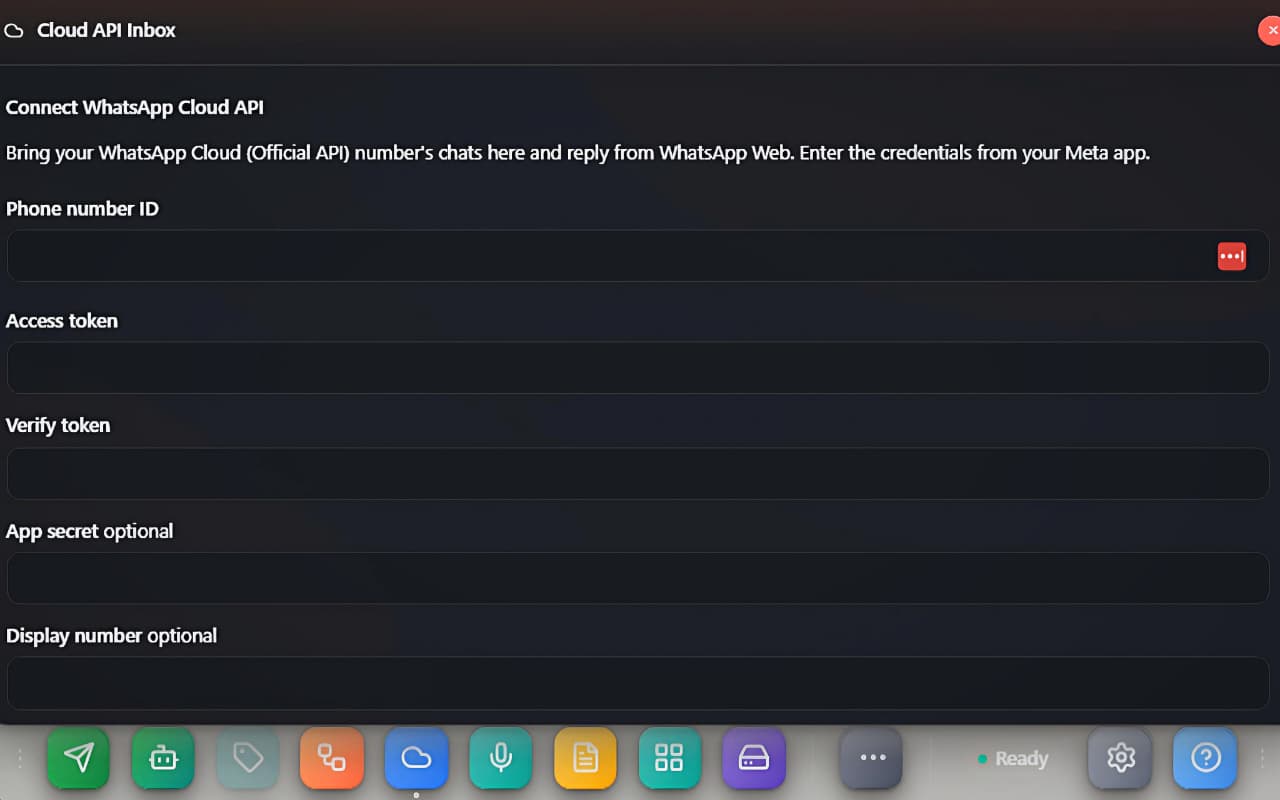 The Connect WhatsApp Cloud API setup form with the credential fields.
| Field | Required | Where it comes from |
|---|---|---|
| Phone number ID | yes | Meta app → WhatsApp → API Setup |
| Access token | yes | Meta app — use a permanent (System User) token, not the 24-hour test one |
| Verify token | yes | Any secret string you invent — Meta echoes it back during webhook verification |
| App secret | optional | Meta app → App settings → Basic; enables webhook signature checks |
| Display number | optional | A label shown in the inbox header, e.g. +91 98765 43210 |
Below the fields sits the Webhook callback URL with a copy button. In your Meta app open WhatsApp → Configuration, paste it as the Callback URL together with your Verify token, and subscribe to the messages webhook field. Then press Save & connect — existing history syncs in and the chat list fills up.
Read and reply
- The left pane lists Cloud API chats with name (or number), time, last-message preview and an unread badge. The header shows the connected number plus Refresh and settings buttons.
- The right pane shows the conversation. Outgoing bubbles carry status ticks: a clock while pending, one tick sent, two ticks delivered, blue ticks read, and an alert icon if Meta rejected the send.
- Type in the composer and hit Enter to send (Shift+Enter for a new line).
The 24-hour reply window
The Cloud API only allows free-form text replies within 24 hours of the customer's last message — that's Meta's platform rule, not ours. An open chat shows a live countdown ("23h 41m left to reply freely"). When it reaches zero the banner flips to "24-hour reply window closed — only a template message can be sent now", and free-text sends will be rejected by Meta until the customer writes again.
Live updates
Real-time pushes ride the API Access socket from Integrations. With an API token connected, new Cloud messages and status ticks appear instantly. Without one, the inbox still works in pull mode — it refreshes whenever you open the window or press Refresh.
Good to know
- Conversations are cached locally per account, so the inbox opens instantly and survives reloads.
- Sending never touches WhatsApp Web's own connection — a Cloud reply cannot affect your personal number's standing.
- Media messages received via the Cloud API show as a
[type]placeholder in the thread for now; text is fully supported both ways. - If a send fails, the exact Graph API error is shown above the composer — most often an expired access token or a closed 24-hour window.